AI automation for a small business: where to start
Pick one repetitive task, time it for a week, and automate it with a person approving anything a customer will read. Here is a plain first-month plan.
Start with a task, not a tool. Pick one repetitive job your team does many times a week, count it for five working days, then automate it with a person approving anything a customer will read. Run it that way for two weeks before you trust it. Federal survey data shows most small firms haven't started yet, so there is time to do this carefully.
Four Week AI Roadmap for Small Businesses: an audio overview of this article.
AI-voiced audio overview of this article. If it differs from the text, the text is the reference.
The best place to start with AI automation in a small business is one repetitive task, not a piece of software. Choose a job your team does many times a week, time it for five working days, then automate it with a person approving anything a customer reads. This article gives you a way to pick that task, a way to measure it, and a first-month plan.
Where should a small business start with AI automation?
Start with the task you repeat most and can check fastest. The U.S. Small Business Administration gives the same advice in fewer words: "AI is relatively new, so start small." It suggests testing free or low-cost tools to see whether they add value before you commit.
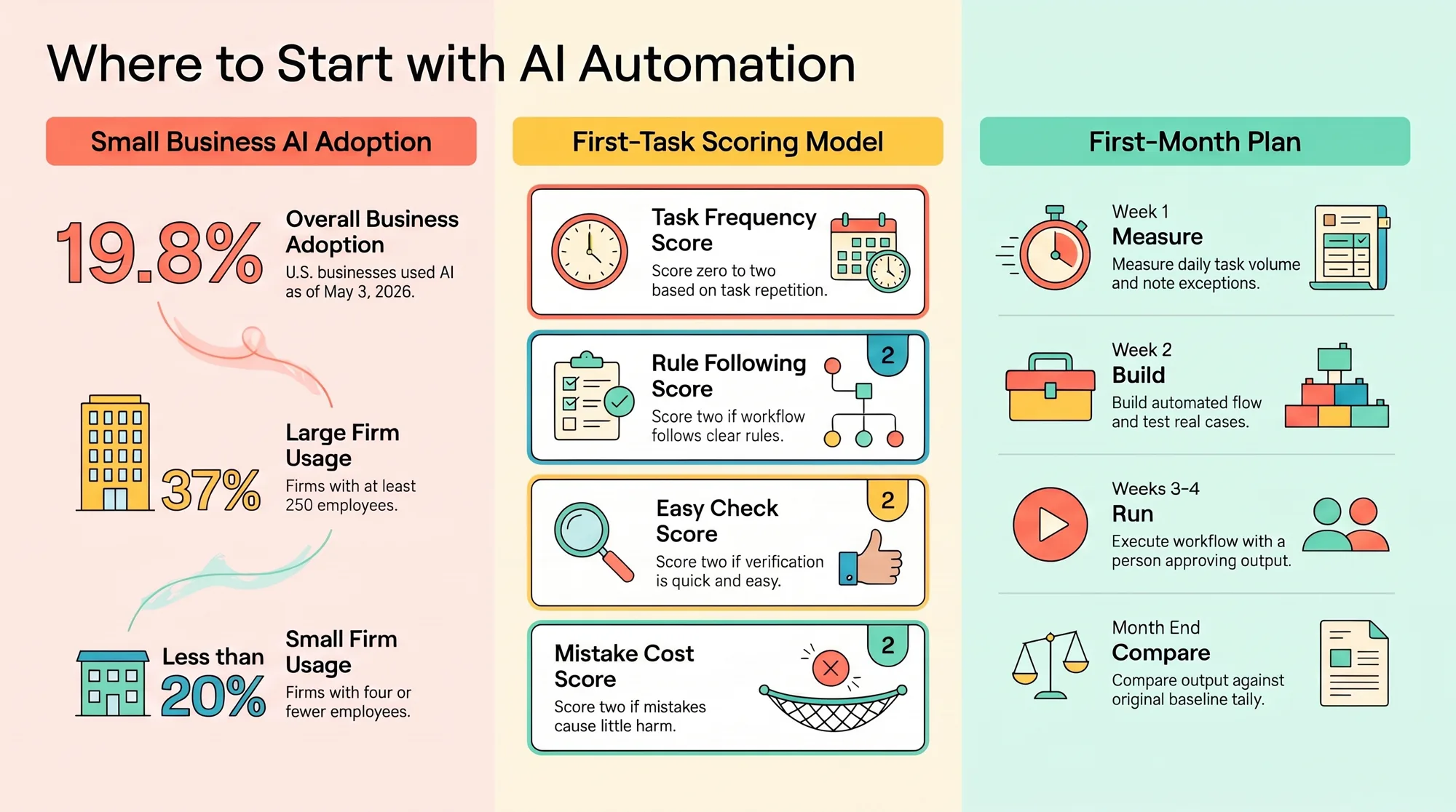
You are not late. The Census Bureau asks businesses every two weeks whether they used AI in any part of the business. As of May 3, 2026:
- 19.8% of U.S. businesses said yes.
- 37% of firms with at least 250 employees said yes.
- Less than 20% of firms with four or fewer employees said yes.
Use among firms with fewer than 20 employees did not change significantly between December 2025 and May 2026. A six-person office in Arvada that picks one task this winter is ahead of most businesses its size.
Which task should you automate first?
Automate the task that is frequent, follows rules, is easy to check and does little harm when it goes wrong. We use a four-question score for this. Call it the Lab 5280 first-task score. Give each question 0, 1 or 2 points:
- Is it frequent? Daily scores 2. Weekly scores 1. Monthly scores 0.
- Does it follow rules? If you could write the steps on an index card, score 2. If every case needs judgment, score 0.
- Is it easy to check? If a person can confirm the result in under a minute, score 2.
- Is a mistake cheap? An internal note with a typo scores 2. A wrong price sent to a customer scores 0.
The highest total wins. Any task that scores 0 on the last question waits, however high the rest of its score.
Here is how common small-office tasks tend to score:
| Task | Why | Verdict |
|---|---|---|
| Sorting incoming email and web forms by type | Daily, rule-based, a wrong label is easy to fix | Good first task |
| Summarizing meetings and calls | Frequent, stays inside the office, quick to skim | Good first task |
| Drafting replies about hours, service area and booking | Frequent and repetitive, a person sends the draft | Good first task |
| Appointment reminders | Fixed wording, fixed timing | Good first task |
| Quotes, estimates and prices | A wrong number is a promise you may have to keep | Keep with a person |
| Complaints and refunds | Every case needs judgment and tact | Keep with a person |
| Hiring, lending or tenant decisions | High stakes, and covered by state law | Not a starter |
For worked examples of the good first tasks, see our seven low-risk automations for small businesses. If missed calls are your biggest leak, our guide to lead follow-up automation for contractors covers that one chain in detail.
How do you measure a task for a week?
Keep a tally sheet for five working days. Each time someone does the task, they add one mark and the minutes it took. Nothing else is needed.
The math is simple. As an example with made-up numbers: a task done 12 times a day at 4 minutes each takes 48 minutes a day. Over a five-day week that is 4 hours. Your own tally gives you the real figure, and it becomes the baseline you compare against later.
The week also shows you the exceptions. Write down every case that didn't fit the usual steps. Those are the cases the automation should hand to a person.
How do you keep a person in charge?
Put an approval step between the AI and the customer. The AI drafts. A person reads, fixes and sends. The Small Business Administration's guide says to have a person assess the messages and outreach AI generates, and to have another person review AI output, especially from free tools.
The common automation tools already support this:
- Zapier has a feature called Human in the Loop. Its help page says it "lets you pause a Zap at a certain step so a human can review before your workflow continues." It is included on the Professional, Team and Enterprise plans, not the Free plan.
- Microsoft Power Automate has an action called "Start and wait for an approval." Microsoft's documentation says the flow "waits for the approvers' response before it completes the run."
Keep the approval step on for at least two weeks. Remove it only for output that stays inside the office, such as labels and summaries.
What should you keep out of AI tools?
Keep sensitive customer data out of any AI tool until you have read its data terms. The Small Business Administration says not to feed sensitive or proprietary information into AI tools. Business plans often carry stronger promises than free personal accounts. OpenAI's business data page, for example, says it does not use data from ChatGPT Business, ChatGPT Enterprise or its API to train its models by default. Read the equivalent page for whatever tool you choose.
Keep AI away from decisions about people, too. Software that helps decide who gets hired, housed, insured or financed is the focus of Colorado's new AI law, which takes effect January 1, 2027. That is not first-project territory.
A first-month checklist
- Week 1: measure. Score your candidate tasks. Tally the winner for five working days. Note the exceptions.
- Week 2: build and test. Check what your current software already does. Build the automation with an approval step. Test it on last week's real cases.
- Weeks 3 and 4: run it with a person approving. Count how often the draft needed fixing.
- End of month: compare. Set the new tally against your baseline. Keep it, adjust it or switch it off. Name one person who owns it from here.
Then pick the second task. A Boulder studio and a Denver contractor will choose different ones, and that is the point of scoring your own. For four of the most common ones written out step by step, see AI automation examples for Denver small businesses.
Common questions
Do I need new software to start with AI automation? Usually not for the first task. Microsoft 365, Google Workspace and most scheduling and job-management software already include automation features. Check what you pay for before you buy anything.
How long does a first AI automation take? Plan on about a month: one week to measure the task, one to build and test, and two with a person approving every result. The building is rarely the slow part.
Is my small business behind on AI? No. The Census Bureau found that 19.8% of U.S. businesses used AI as of May 3, 2026, and under 20% of firms with four or fewer employees.
Should AI send messages to customers on its own? Not at first. Let it draft and have a person approve and send. The Small Business Administration advises having a person review AI-written messages.
The first automation matters less for the hours it returns than for what your team learns about checking a machine's work. At Lab 5280 we work with your team, not just for you, and we focus on automating how the business actually runs. Here is how we approach AI automation.
This article is general information, not legal advice.
Not sure which task to pick?
Send us the three jobs your team repeats most. We'll score them with you and say which one we'd start with.
Talk to Lab 5280- Large Firms With at Least 20 Employees Biggest AI Users — U.S. Census Bureau, Business Trends and Outlook Survey (May 26, 2026)
- AI for small business — U.S. Small Business Administration
- Use Human in the Loop to collect data and approve requests in Zaps — Zapier Help
- Get started with Power Automate approvals — Microsoft Learn
- Business data privacy, security, and compliance — OpenAI