The PHP2Shell vulnerability: is your website patched?
Two critical flaws in PHP, the language behind most websites, let an attacker run code on a server without logging in. The fix shipped October 21. Here is how to tell whether your site has it.
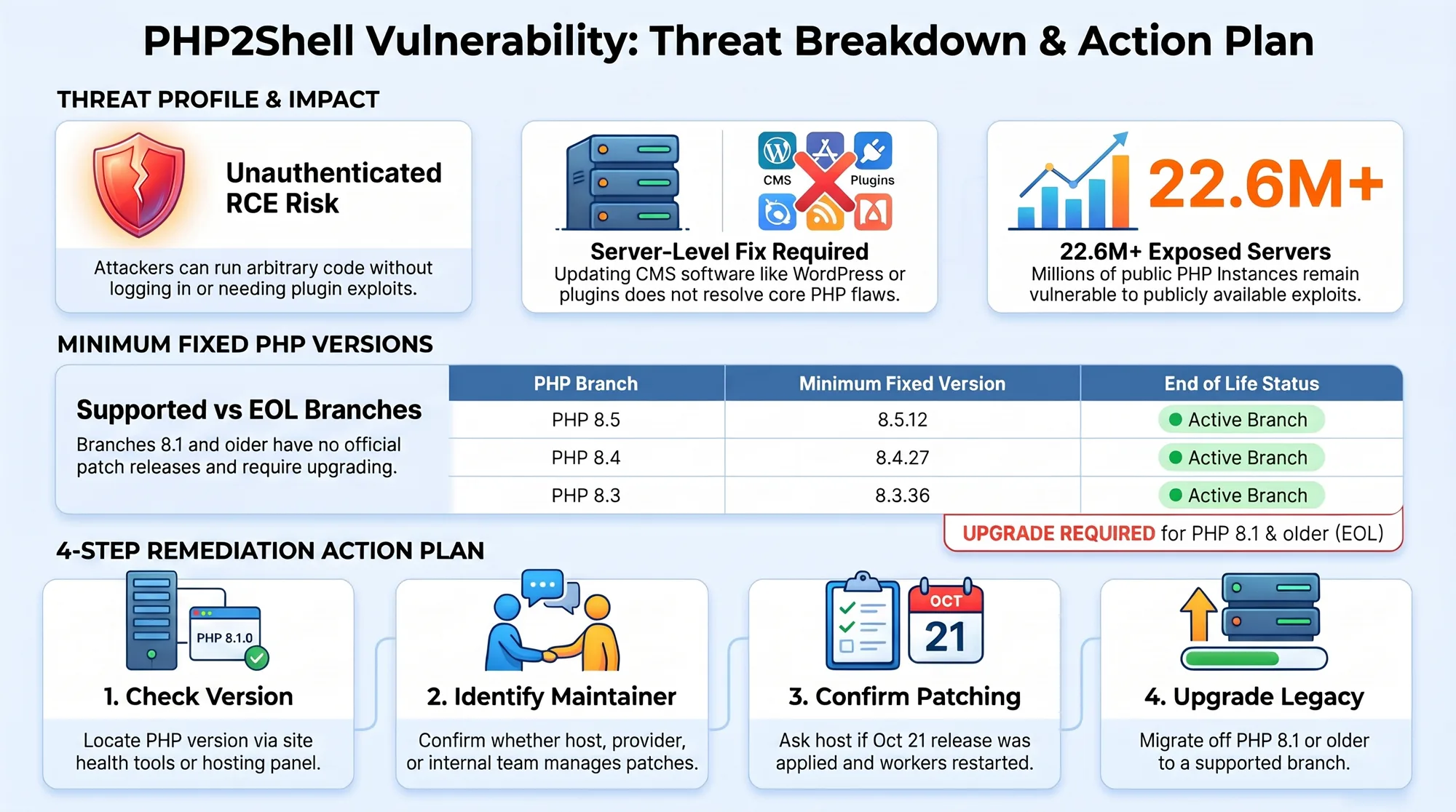
A critical PHP vulnerability nicknamed PHP2Shell lets an attacker take control of a web server with a single crafted request: no password, no plugin needed. If your website runs on WordPress, Drupal, Joomla, Magento or anything else built on PHP, confirm today that your server runs PHP 8.5.12, 8.4.27, 8.3.36 or 8.2.35 or later. Sites on PHP 8.1 or older have no official fix and need an upgrade. If you are not sure who looks after your server, email us and we will help you find out.
How PHP2Shell Threatens Millions of Servers: an audio overview of this article.
AI-voiced audio overview of this article. If it differs from the text, the text is the reference.
On October 21, 2026, the PHP project put out an emergency security release for two flaws, tracked as CVE-2026-109618 and CVE-2026-109619. Security researchers call the pair PHP2Shell. Both carry a severity score of 9.2 out of 10, and both allow what the industry calls unauthenticated remote code execution: someone on the internet, who has never logged in, can make your web server run their commands.
This PHP vulnerability matters to small businesses in Denver, Boulder and Arvada for a simple reason. PHP sits underneath most websites, including every WordPress site. The flaw is in PHP itself, so it does not matter how careful you have been with plugins or themes. Updating WordPress does not fix it. Only updating PHP on the server does.
What happened, in plain English
PHP is the program on your web server that turns your site's code into the pages visitors see. Each time someone loads a page, PHP sets aside a bit of memory for that request and cleans it up afterwards.
The two flaws live in that housekeeping. According to PHP's advisory, the first (CVE-2026-109618) happens when PHP runs out of memory while it is still setting up a request, leaving that request's data half-built. The second (CVE-2026-109619) lets leftover data from one request, after its memory has been freed, be picked up by the next request on the same worker. An attacker who arranges either situation on purpose can get the server to run code of their choosing.
The worst part: PHP's security team rates the risk highest on Apache with mod_php, a common hosting setup, where an attack can succeed before any of your site's own code has run. PHP says every installation that serves web requests is in scope, including PHP-FPM, php-cgi, LiteSpeed and FrankenPHP.
Why this PHP vulnerability is urgent
Details leaked before the fix was ready. Per the security firm Huntress, a post claiming two critical PHP flaws were coming appeared on October 20 and was taken down, but screenshots spread. PHP moved its release up and published the fixes the next day.
Reports on attacks since then vary. The security firm watchTowr says its honeypots, decoy servers set up to attract attackers, have seen exploitation in the wild since October 21. Cloudflare says it saw attack traffic against its customers and that attackers changed their payloads to get around its filters. Canada's Centre for Cyber Security, updating its alert on October 23, said a proof-of-concept exploit is public but it had not yet identified active exploitation, and warned that could change quickly. Palo Alto Networks' Unit 42 counted more than 22.6 million internet-facing PHP instances potentially exposed.
When working exploit code is public and millions of targets are reachable, the gap between "disclosed" and "being attacked" is measured in days. Treat this as this week's job, not this quarter's.
Is your website affected?
Your site is affected if it runs on PHP and the server has not been updated since October 21. These are the fixed versions, by branch:
- PHP 8.5: 8.5.12 or later
- PHP 8.4: 8.4.27 or later
- PHP 8.3: 8.3.36 or later
- PHP 8.2: 8.2.35 or later. PHP 8.2 reaches end of life on December 31, 2026, so plan the next upgrade now.
- PHP 8.1, 8.0 and 7.4: no official release. PHP published source patches for people who build PHP themselves, and some Linux distributions ship their own fixes. For most businesses the right answer is to upgrade.
- PHP 7.3 and older, including PHP 5: no fix at all. Upgrade, or take the site offline until you can.
Linux distributions often patch PHP without changing the headline version number, so a host's own package update may cover you even if the version looks older. Ask them to confirm in writing.
How to check, and what to ask your host
- Find your PHP version. In WordPress, go to Tools → Site Health → Info and open the Server section. In cPanel or a similar hosting panel, look for "Select PHP Version" or "MultiPHP Manager."
- Find out who patches the server. On managed or shared hosting, the host usually updates PHP for you. Some large hosts have already said they patched every server on October 21. On a VPS or your own server, it is your job, or your IT provider's.
- Ask your host three questions: Have you applied the October 21 PHP security release (CVE-2026-109618 and CVE-2026-109619) to my server? Which PHP version or package is my site on now? Did you restart the PHP workers afterwards? (The fix does not take effect on running workers until they restart.)
- If you are on an old PHP branch, switch to a supported one in your hosting panel, then check that the site still works. Old plugins sometimes break on newer PHP, which is why it pays to test on a staging copy first.
Firewall rules from services like Cloudflare can block known attack patterns in the meantime, and PHP lists some configuration changes that reduce the risk. PHP is clear that these are stopgaps: updating is the only complete fix.
If you think your site was hit
Successful attacks do not always crash anything, so look for what an intruder leaves behind. Huntress and the Canadian Cyber Centre suggest these checks:
- New or changed files in your website folder that nobody on your team added, especially PHP files with odd names.
- New admin users in WordPress or your hosting panel, or new scheduled tasks (cron jobs).
- Your host reporting unusual processes, outbound traffic or spam sent from your account.
If you see any of that, don't start deleting things. Ask your host to preserve the server and PHP logs, take the site offline or behind a maintenance page, then clean it or restore from a backup made before the details leaked on October 20. Wiz researchers reported that a related memory leak could expose passwords, keys and tokens stored on the server, so change your hosting, database, admin and email passwords from a clean device. Our guide to checking whether a password has leaked covers the order to do it in.
For a small business, the real lesson
Most owners don't know which PHP version their site runs, who updates it, or how fast. That's normal, and it's exactly what an emergency like this exposes. Write down three things: where your site is hosted, who has the login, and who is responsible for server updates. If the answer to the last one is "nobody," that's the gap to close. Our notes on how to choose IT support cover what to ask about response times when something like this lands.
At Lab 5280 we work with your team, not just for you, and our focus is on automating how a business runs. That includes the unglamorous parts, like knowing within an hour of an advisory which of your systems are affected.
Common questions
Does updating WordPress fix PHP2Shell?
No. The flaw is in PHP itself, so updating WordPress, plugins or themes does not fix it. Only updating PHP on the server does.
Which PHP versions are fixed?
PHP 8.5.12, 8.4.27, 8.3.36 and 8.2.35 or later. PHP 8.1, 8.0 and 7.4 have no official release, and PHP 7.3 and older have no fix at all, so those sites need an upgrade.
Does PHP need a restart after the update?
Yes. The fix does not take effect on running workers until they restart, so ask your host to confirm they did it.
Affected, or not sure? Reach out now.
If your website runs on PHP and you can't confirm it's patched, email us today. We'll help you check your version, talk to your host, and get the update done or the site protected in the meantime.
Email humans@lab5280.comWebsite care & hosting · Lab 5280 in Denver · Free site audit
- Security advisory: critical remote code execution vulnerabilities, update now (Oct 21, 2026) and informational advisory on session upload progress (Oct 23, 2026) — PHP.net
- AL26-026: Critical vulnerabilities impacting PHP (CVE-2026-109618, CVE-2026-109619) — Canadian Centre for Cyber Security
- Rapid Response: php2shell, leaked critical PHP vulnerabilities — Huntress
- PHP2Shell FAQ: CVE-2026-109618 and CVE-2026-109619 fixes — watchTowr
- Threat Brief: Critical vulnerabilities in PHP (updated Oct 25) — Palo Alto Networks Unit 42
- Cloudflare blocks php2shell exploits nine hours before PHP flaws went public — PPC Land
- Critical PHP vulnerabilities: SiteGround sites protected — SiteGround