
Microsoft 365 vs Google Workspace for a Colorado small office
The two now cost the same at every tier. The real question is how your team works, who you trade files with, and how much security you want built in.
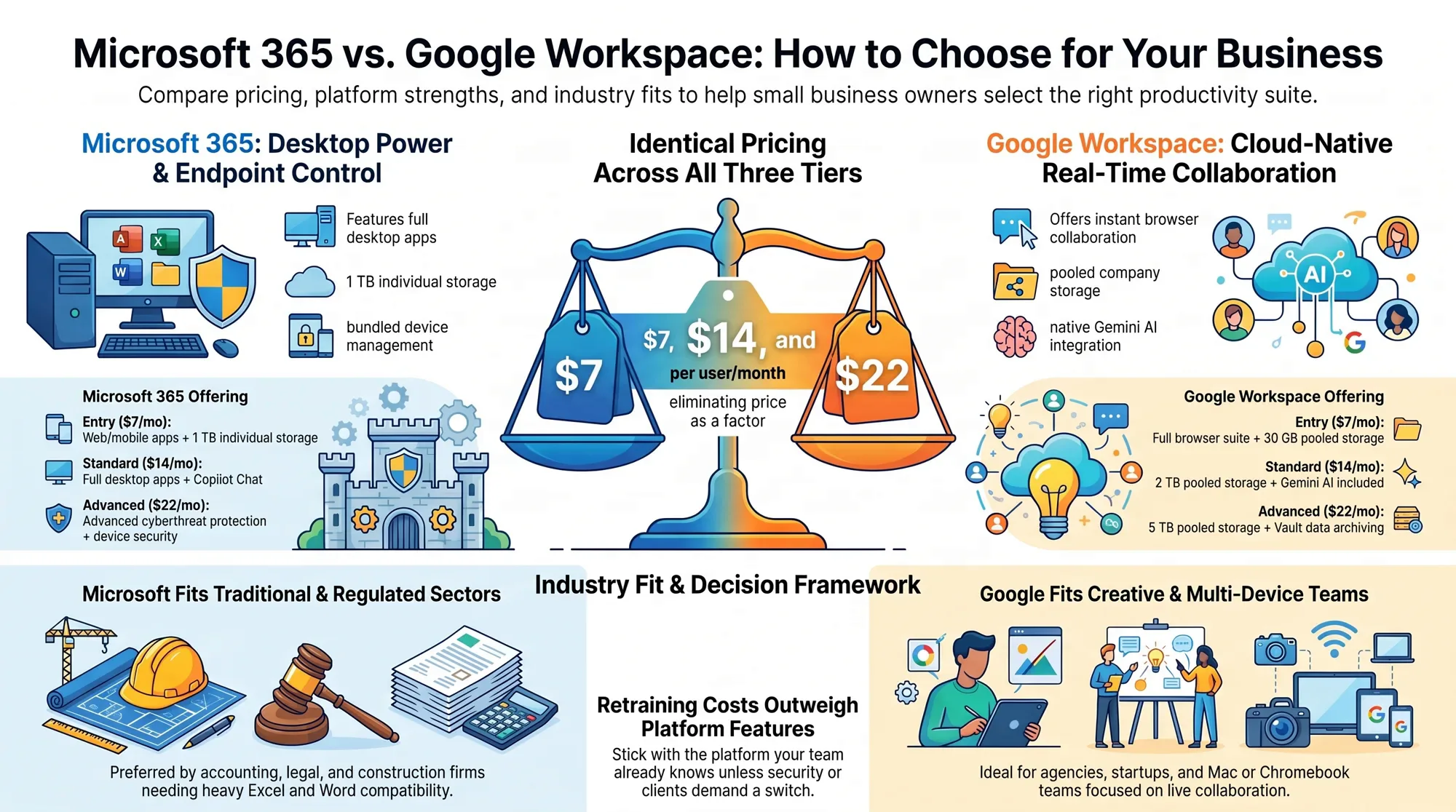
Since Microsoft's July 2026 price change, the two suites list at the same three prices: $7, $14 and $22 per user per month. So price no longer decides it. Pick Microsoft 365 if your work lives in Excel, Word and Outlook or your clients send you those files. Pick Google Workspace if your team works in a browser and edits together all day. Either way, the middle tier is the sensible starting point, and switching later is doable but is a real project.
Choosing Microsoft 365 or Google Workspace: an audio overview of this article.
AI-voiced audio overview of this article. If it differs from the text, the text is the reference.
Choosing between Microsoft 365 vs Google Workspace for a small business used to start with a price comparison. That part is now a tie. For a ten-person office in Denver, Boulder or Arvada, the difference between the two shows up somewhere else: in which programs your people already know, what your clients and vendors send you, and how much of your security you want handled by the same subscription.
Both are good. Both give you business email on your own domain, shared calendars, video meetings, cloud file storage and an office suite. This post lays out what you get at each price, which kinds of business tend to fit which side, and what it takes to move if you are on the wrong one.
What each one costs in late 2026
These are the vendors' own published U.S. list prices, per user per month. Both charge less for a one-year commitment than for month-to-month, and resellers sometimes price differently, so treat these as the reference point.
Microsoft 365 (Microsoft raised two of these on July 1, 2026; existing customers moved to the new price at their next renewal):
- Business Basic, $7 (was $6). Email, Teams, 1 TB of OneDrive storage per person, and the web and mobile versions of Word, Excel and PowerPoint. No installed desktop apps.
- Business Standard, $14 (was $12.50). Everything in Basic plus the full desktop apps.
- Business Premium, $22 (unchanged). Everything in Standard plus what Microsoft describes as advanced cyberthreat protection and device management.
Google Workspace:
- Business Starter, $7. Gmail on your domain, Meet for up to 100 participants, 30 GB of pooled storage per user.
- Business Standard, $14. 2 TB of pooled storage per user, Meet for up to 150, and Gemini (Google's AI assistant) across Gmail, Docs, Meet and more.
- Business Plus, $22. 5 TB of pooled storage per user, Meet for up to 500, Vault for retaining and searching company data, and advanced management of staff devices.
Both families top out at 300 users, which is far more room than most Front Range small offices need. "Pooled" storage means the allowance is shared across the company, so one heavy user can borrow from a light one.
Microsoft 365 vs Google Workspace for small business: where they really differ
The apps themselves. Microsoft's strength is the installed desktop programs. If someone on your team builds serious spreadsheets, uses mail merge, or lives in Outlook with years of folders and rules, nothing in a browser fully replaces that. Google's strength is the opposite: everything opens in a browser tab, several people type in the same document at once without thinking about it, and there is nothing to install or update.
The entry tier. At $7, Microsoft gives each person 1 TB of file storage but only web and mobile apps. Google gives a full browser suite but only 30 GB per user. An office with lots of photos, drawings or scanned records will outgrow Google's Starter tier quickly.
Security and device control. This is the biggest gap at the top tier. Microsoft's Business Premium bundles threat protection and the tools to manage company laptops and phones. Google's Business Plus adds Vault and advanced endpoint management, while data loss prevention and context-aware access are listed only on its Enterprise plans. If a cyber insurer or a client contract is asking you about device management and data protection, read those tier lists carefully before you buy. Whichever suite you choose, the basics matter more than the tier: unique passwords with two-step sign-in, and a rule that payment details never change over email alone.
AI. Both now put an assistant in the box. Google includes Gemini in Gmail on Starter and across more apps from Standard up. Microsoft includes Copilot Chat in its Business plans and has been adding to it as part of the 2026 update. Neither should be the deciding factor yet; the feature lists change every few months.
Which fits which kind of business
- Accounting, bookkeeping, law, engineering, construction: usually Microsoft. Your clients, your banks and your industry software expect Excel and Word files, and round-tripping them through another format causes small, annoying errors.
- Agencies, studios, startups, nonprofits, anyone on Macs and Chromebooks: usually Google. A Boulder design studio with five people editing the same proposal gets more from live collaboration than from desktop Excel.
- Trades and field crews: either works. What matters is that the phone app is simple and the shared calendar is reliable. Choose whichever one the office manager already knows.
- Medical, dental and other regulated offices: either can be configured for it, but check with your compliance advisor and your practice software vendor first, because the answer often depends on which tier you buy and what agreements are in place.
One honest rule of thumb: the suite your team already knows is worth more than any feature difference. Retraining ten people costs more than the license.
What switching really involves
Both vendors publish migration paths toward themselves, and both have limits worth knowing before you promise anyone a painless weekend.
Google to Microsoft. Microsoft's own guide moves mail and rules, calendar and contacts, in batches of users so you can go in stages. It also lists what does not come across: shared calendars, calendar event colors, room bookings, and vacation or automatic-reply settings. Migrated mail rules arrive switched off so people can check them first. Files in Google Drive are a separate job.
Microsoft to Google. Google documents importing email, calendars and users from Exchange Online, files, folders and permissions from OneDrive and SharePoint, and chat messages from Teams.
The mail is the easy part. The work is in everything around it:
- Inventory first. List every mailbox, shared mailbox, alias, distribution list and shared folder, and who owns each.
- Find what signs in with the old account. Scanners that email PDFs, the accounting package, the phone system, the website contact form.
- Clean up before you move. Close accounts for people who left. Don't pay to migrate clutter.
- Run a pilot. Move two or three people, including one heavy user, and live with it for a week.
- Pick a quiet cutover date. Not month-end for a bookkeeper, not the first big snow week for a plow contractor.
- Keep the old subscription for a short overlap so nothing is lost if something was missed.
- Turn on multi-factor authentication on day one of the new system, not "later."
How to decide in an afternoon
Answer four questions. What file types do your top five clients send you? Does anyone depend on a desktop-only feature? Do you need to manage and lock down company devices? And which suite does your team already use at home or at their last job? If three of the four point one way, that's your answer.
If you're on one suite and it mostly works, stay. Spend the effort on setting it up properly: MFA for everyone, shared folders with clear owners, and a tested backup. That does more for a small office than changing logos.
At Lab 5280 we work with your team, not just for you, and our focus is automating how the business runs. The email and file platform is the foundation those automations sit on, so we'd rather help you choose it once and set it up well.
Common questions
Is Microsoft 365 or Google Workspace cheaper?
Neither at list price. Since Microsoft's July 2026 price change, both list at $7, $14 and $22 per user per month. Both charge less for a one-year commitment than for month-to-month.
Which one should a small office choose?
Pick Microsoft 365 if your work lives in Excel, Word and Outlook or your clients send you those files. Pick Google Workspace if your team works in a browser and edits together all day. The suite your team already knows is worth more than any feature difference.
How hard is it to switch?
It is doable, but it is a real project. The mail is the easy part. The work is finding everything that signs in with the old account, cleaning up first, running a pilot and picking a quiet cutover date.
Weighing a move, or not sure you're on the right tier?
Tell us how your office works and what you're paying for today. We'll help you sort out which suite and plan fit, and what a switch would take.
Talk to Lab 5280Managed IT (client list full, applications open) · Lab 5280 in Denver · Free site audit
- Microsoft 365 Pricing and Packaging Updates — Microsoft Licensing
- Microsoft 365 Pricing for Business: Plans & Features — Microsoft
- Microsoft 365 and Office 365 plan options — Microsoft Learn
- Google Workspace plans and pricing — Google
- Perform a Google Workspace migration to Microsoft 365 or Office 365 — Microsoft Learn
- Migrate your organization's data to Google Workspace — Google Workspace Admin Help