AI automation for Denver small businesses: four examples, step by step
Lead replies, review requests, inbox sorting and appointment reminders: what starts each one, what the software does, and what a person still does.
Most useful AI automation in a small office follows one pattern: something arrives, software drafts or sorts, a person approves, and the result is logged. Four examples fit almost any Denver business: replying to new leads, asking for Google reviews, sorting a shared inbox and sending appointment reminders. Much of it runs on software you already pay for. These are worked patterns, not client stories.
Why Small Business AI Needs Human Approval: an audio overview of this article.
AI-voiced audio overview of this article. If it differs from the text, the text is the reference.
AI automation for a Denver small business usually means four ordinary jobs: replying to new leads, asking for reviews, sorting the inbox and sending reminders. In each one, software does the first pass and a person approves what a customer reads. Below is each example, step by step, with the rules that apply.
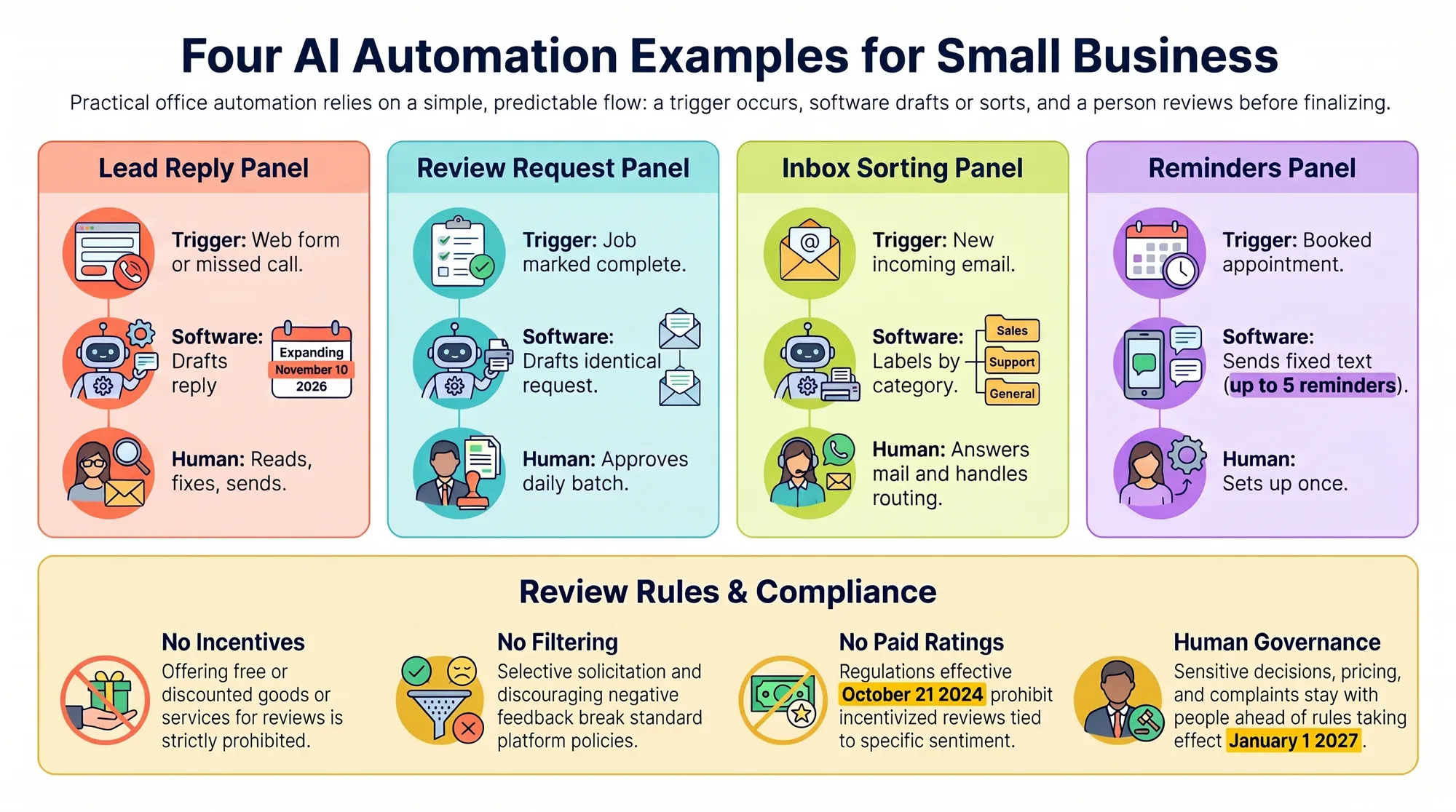
What does AI automation look like in a Denver small business?
It looks like a short chain with a person in the middle. A trigger starts it. Software drafts or sorts. A person checks. The result lands somewhere you can find it later. Here are the four examples side by side:
| Example | What starts it | What the software does | What a person does |
|---|---|---|---|
| Lead reply | A web form or missed call | Drafts a reply | Reads, fixes, sends |
| Review request | A job marked complete | Drafts the same request for every customer | Approves the batch |
| Inbox sorting | A new email | Labels it by type | Answers it |
| Reminders | A booked appointment | Sends fixed wording on a schedule | Sets it up once |
If you haven't chosen a first task yet, our guide to where to start with AI automation has a four-question score for picking one.
Example 1: How do you reply to a new lead faster?
Let software write the first draft the moment a form comes in, and have a person send it. Picture a plumbing company in Globeville. A homeowner in Park Hill fills in the quote form at 7:40 a.m. while the crew is loading the truck.
- Trigger. The form lands in the shared mailbox.
- Draft. The office manager opens it and asks the mail program for a reply. On November 10, 2026, Google said it was expanding "Help me write," which drafts an email from a short prompt, to all Google Workspace customers, switched on by default. Microsoft's Outlook has a matching feature called Draft with Copilot, if your plan includes Copilot.
- Approve. She checks the name, the service and the time window, then sends.
- Log. The lead goes into the job list with a follow-up date.
If you want the draft prepared before anyone opens the email, an automation tool can do that. Zapier's Human in the Loop feature pauses a workflow "so a human can review before your workflow continues." It needs a paid Zapier plan.
Texting a lead back is a separate matter with its own consent rules. We cover those in lead follow-up automation for Denver contractors.
Example 2: How do you ask for Google reviews without breaking the rules?
Send every customer the same request, offer nothing in return, and never filter by how happy they seemed. Asking is allowed. Google's own Business Profile help page says to "remind customers to leave reviews" and lets you create a link or QR code for it.
Three rules shape the automation:
- No incentives. Google says offering free or discounted goods or services in exchange for reviews "is strictly prohibited."
- No filtering. Google's Maps policy does not allow a business to "discourage or prohibit negative reviews, or selectively solicit positive reviews from customers." A system that asks only customers who gave a thumbs-up breaks this rule.
- No paying for a rating. A Federal Trade Commission rule, in effect since October 21, 2024, prohibits incentives "conditioned on the writing of consumer reviews expressing a particular sentiment, either positive or negative."
So the workflow is plain. When a job is marked complete, the software drafts a short thank-you with your review link. Every customer gets it. A person approves the day's batch, which also catches the customer you already know is upset and should call instead.
Example 3: How do you sort a shared inbox?
Use ordinary rules for the sorting and save AI for the summary. A design studio in RiNo with one info@ address gets quote requests, vendor invoices, job applications and newsletters in the same pile.
Gmail's filters can "send email to a label," and Outlook's rules do the same job with folders. A filter for invoices, one for web-form leads and one for applications takes a few minutes each and needs no AI at all. The AI part comes after: Google's November update also brought AI summaries of long conversations to more Workspace users, so whoever picks up a thread can catch up fast.
What stays with a person: every reply, and the decision about who handles what.
Example 4: How do you cut no-shows with reminders?
Turn on the reminders in the booking tool you already have. A salon on South Broadway or a clinic in Wash Park does not need AI for this. The wording is fixed, which is why it is safe to run without review.
- Google Calendar appointment schedules send confirmation and reminder emails. Google's help page says you can send up to 5 reminders, and that you can't edit their text.
- Microsoft Bookings can send text reminders. Microsoft's documentation says customers need a valid United States, Canada or United Kingdom phone number, can opt in or out on the booking page, and can stop messages by replying STOP.
What should stay with a person?
Prices, complaints and any decision about a person's job, housing, loan or insurance stay with people. A wrong price in an email is a promise you may have to keep. A complaint needs tact. Decisions about people are the focus of Colorado's new AI law, which takes effect January 1, 2027.
A setup checklist for any of the four
- Write the chain on one line. Trigger, draft, approve, log.
- Check your current software first. Look in Gmail, Outlook, your calendar and your booking tool before buying anything.
- Name the approver. One person, with a backup for days off.
- Test on last week's real cases. Ten is enough to see where the drafts go wrong.
- Review after two weeks. Count how often a draft needed fixing. Keep it, adjust it or switch it off.
Common questions
What is an example of AI automation for a small business? A new web form arrives, the software drafts a reply, and a person reads it and presses send. Review requests, inbox sorting and appointment reminders follow the same pattern.
Can I automate Google review requests? Yes, if every customer gets the same request and nobody is offered anything for it. Google prohibits incentives for reviews and does not allow selectively soliciting positive reviews.
Do I need to buy new software for these automations? Often not. Gmail, Outlook, Google Calendar and Microsoft Bookings already include drafting, filters and reminders. Check what your current plan includes before you buy anything.
Should AI reply to customers without a person checking? Not for anything written fresh. Fixed-wording reminders can go out on their own. A drafted reply should be read and sent by a person.
None of these four is clever, and that is the point. At Lab 5280 we work with your team, not just for you, and we focus on automating how the business actually runs. Here is how we approach AI automation.
This article is general information, not legal advice.
Want one of these four set up?
Tell us which example fits your office and what software you use now. We'll say what it would take and what we'd leave to a person.
Talk to Lab 5280- Expanding Gemini in Gmail to more Google Workspace users — Google Workspace Updates (November 10, 2026)
- Draft an email message with Copilot in Outlook — Microsoft Support
- Request approval to keep your workflow running with Human in the Loop — Zapier Help
- Tips to get more reviews — Google Business Profile Help
- Prohibited & restricted content — Google Maps User Generated Content Policy
- Federal Trade Commission Announces Final Rule Banning Fake Reviews and Testimonials — FTC (August 14, 2024)
- Trade Regulation Rule on the Use of Consumer Reviews and Testimonials, 16 CFR Part 465 — Federal Register (August 22, 2024)
- Create rules to filter your emails — Gmail Help
- Create an appointment schedule — Google Calendar Help
- Configure SMS text notifications and reminders in Microsoft Bookings — Microsoft Learn